 24bf0ab18f
Roles are workspace-admin presets that customize the AI agent's system-
prompt persona and, optionally, the model, attached to a chat at creation
time. Examples: a 'Proofreader' that only touches grammar, a 'Fact-
checker' that cites web sources. A role changes ONLY instructions and
( optional ) the model; the toolset stays full, so the security boundary
(CASL via the per-user loopback token) is unchanged.

Backend:
- Migration 20260620T150000-ai-agent-roles: ai_agent_roles table
  (workspace-scoped, soft-delete, model_config jsonb) + ai_chats.role_id
  (ON DELETE SET NULL).
- AiAgentRoleRepo / AiAgentRolesService / AiAgentRolesController at
  /workspace/ai-agent-roles. LIST (picker view) is open to all workspace
  members; create/update/delete are admin-only. The picker view omits
  instructions and model_config so they never leak to non-admins.
- buildSystemPrompt: optional roleInstructions REPLACES the admin persona
  (priority order: role > admin > default). The non-removable
  SAFETY_FRAMEWORK is always appended - a role cannot strip it.
- AiChatService.stream: persists roleId on first turn; subsequent turns
  read role_id from the chat row, never from the request body. The role's
  instructions are applied even if it was later disabled or soft-deleted
  (existing chats keep their persona).
- AiService.getChatModel accepts an optional override. Same-driver
  overrides reuse the workspace key; cross-driver (openai/gemini) loads
  alternate creds from ai_provider_credentials and throws a clean 503 if
  they are missing (no silent fallback). Cross-driver ollama is rejected
  with a clear message (no per-driver ollama base URL exists yet).
- Controller resolves the role model BEFORE res.hijack so misconfigured
  overrides return JSON 503, not a broken stream.

Client:
- New chat picker (Mantine Select) lists enabled roles, default
  'Universal assistant' (roleId null). The roleId is sent only when
  starting a new chat; existing chats show the role as a fixed badge.
- Role badge in the chat window header and conversation list.
- Settings -> AI: new 'Agent roles' management section mirrors the
  external MCP servers UI (add/edit/delete + enable toggle + optional
  model override). Form fields: name, emoji, description, instructions,
  model override (driver + chatModel), with a reminder that the safety
  framework is always appended.

Hardening after review:
- Empty-string roleId coerced to null on both client and server (picker
  'Universal assistant' option used to crash the uuid INSERT).
- New-chat insert validates picker-eligibility (enabled + not soft-deleted
  + workspace-scoped); ineligible ids silently fall back to null.
- findByCreator's role JOIN is workspace-scoped and every column ref is
  table-qualified (avoids Postgres ambiguous-column errors).
- getChatModelForRole applies the same picker-eligibility gate as stream
  on the new-chat path, so model and persona resolve from one source.
Gitmost
Open-source collaborative wiki and documentation software.
A fully-open community fork of Docmost.
English · Русский
About this fork
Gitmost is a community fork of Docmost, an open-source collaborative wiki and documentation app.
The goal of the fork is a 100% open, AGPL-only build with no Enterprise-Edition (EE) code:
- No EE code at all. All proprietary Enterprise-Edition sources were removed — the private
apps/server/src/eesubmodule, theapps/client/src/eedirectory (201 files) and thepackages/eepackage are gone. There is no license gating: every feature is available to everyone. - Replacements are written from scratch. Features that previously lived behind the enterprise
license (e.g. comment resolution, the AI agent chat, the
/mcpserver) were re-implemented from scratch on top of the community codebase. No EE code is reused, and there is no entitlement/feature-flag wall. - No upsell. There are no "buy a license" / "upgrade to Enterprise" banners, trial nags, or locked-feature placeholders anywhere in the UI.
- Authentication is plain email + password (no SSO/LDAP/cloud/billing flows).
What's different from Docmost
| Change | Details |
|---|---|
| EE code removed | Stripped all client and server Enterprise-Edition code; ships as a clean community/AGPL build with no license checks. |
| Comment resolution | Re-implemented from scratch as a community feature (resolve / re-open with Open/Resolved tabs). No EE code reused, available to anyone who can comment. |
| Embedded MCP server | A community MCP server (@docmost/mcp, 38 tools) is served over HTTP at /mcp — no enterprise license required. Replaces the removed license-gated EE MCP. |
| AI agent chat | Built-in AI agent chat over your wiki, written from scratch as a community feature — no enterprise license. The agent reads and edits pages on your behalf (scoped to your permissions), with full-text + vector (RAG) search and optional web access via external MCP servers. |
| Rebranding | App logo / name changed from Docmost to Gitmost. |
| Compact page tree | Default page-tree indentation reduced from 16px to 8px per nesting level. |
| Persistent page-tree state | The sidebar page tree remembers which nodes you expanded/collapsed across reloads — saved in the browser (localStorage), scoped per workspace + user so accounts sharing a browser don't clash. Upstream Docmost forgets the tree on every reload. |
| CI / images | Release CI publishes container images to GHCR (ghcr.io/vvzvlad/gitmost) using the built-in GITHUB_TOKEN instead of Docker Hub. |
Embedded MCP server
Gitmost has our own MCP server — docmost-mcp,
which we wrote — built directly into the app and served at /mcp. It exposes 38
agent-native tools: surgical per-block edits (patch / insert / delete by id),
structure-preserving find/replace, scripted (doc) => doc transforms with a dry-run diff,
structured table editing, version history with diff / restore, comments, images and share
links — all applied through Docmost's real-time-collaboration layer, so a write never
clobbers a concurrent human edit.
Better than Docmost's own MCP. Docmost's built-in MCP is an enterprise feature, and its tools are coarse — read a page as Markdown, create / move / delete pages, replace a whole page. Ours is built around how an agent actually edits: address one block and patch it, or program the change, instead of round-tripping a ~100 KB document through the model on every little fix. And it needs no enterprise license.
Gitmost /mcp (our docmost-mcp) |
Docmost's built-in MCP | |
|---|---|---|
| Enterprise license | Not required | Required |
| Tools | 38, agent-native | Coarse (read Markdown, page CRUD, replace whole page) |
| Per-block edits / find-replace / scripted transforms | ✅ | — |
| Structured table editing, version diff / restore | ✅ | — |
| Comments, images, share links | ✅ | — |
| Safe real-time-collab writes (no clobber) | ✅ | — |
Same server as standalone docmost-mcp — just bundled. This is the exact
docmost-mcp you can also run on its own; embedding
it doesn't make it more capable, you simply don't have to install and run a separate
process. An admin flips one toggle in Workspace settings → AI and any MCP client
points at ${APP_URL}/mcp.
AI agent chat
Gitmost ships a built-in AI agent chat over your wiki — written from scratch as a community feature, with no enterprise license. Open it from the page header; the agent can read and edit your workspace on your behalf:
- Full read + write toolset (~40 tools). Search and read pages, make surgical per-block and table edits, create / rename / move pages, diff and restore page history, and create / resolve comments — every action runs under your permissions (Docmost CASL), so the agent can never see or change anything you couldn't.
- Safe by design. The agent is given only reversible operations (page history + trash); permanent deletion is never exposed. Agent edits are marked in page history with an "AI agent" badge linking back to the chat.
- Search over your content. Full-text search plus optional vector (RAG) semantic search across pages.
- Web access via external MCP. Admins can connect external MCP servers (e.g. Tavily) to give the agent web search / internet access.
- Bring your own model. Configure an OpenAI-compatible endpoint — OpenAI, OpenRouter, a local Ollama, or any self-hosted server — plus the model and API key in Workspace settings → AI. The key is encrypted and never leaves the server.
Roadmap
Done
- ✅ MCP server — embedded community MCP server served at
/mcp. - ✅ macOS app — native macOS app (gitmost-app) that embeds the UI with multi-server tabs.
- ✅ AI chat — built-in AI agent chat over your wiki content (read + write, RAG search, configurable provider, optional web access via external MCP).
- ✅ Voice dictation — microphone button in the AI agent chat and the page editor; audio is transcribed server-side (Whisper / OpenAI-compatible STT) via the workspace AI provider, with an admin toggle to show/hide it.
In progress
- 🚧 Git synchronization — two-way sync of pages with a Git repository.
Planned
- 🔭 Page templates — flag a page as a template and embed its whole content live into other pages; edits to the template propagate to every place it is inserted (whole-page transclusion on top of the existing synced blocks). See docs/page-templates-plan.md.
- 🔭 Viewer comments — let read-only viewers leave comments.
- 🔭 Public-share AI assistant — let anonymous visitors of a shared page ask the AI agent, scoped strictly to that share's page tree (read-only, share-scoped search), behind a workspace toggle. See docs/public-share-assistant-plan.md.
- 🔭 Password-protected pages — protect individual pages / shares with a password.
- 🔭 Windows / Linux app — native desktop app for Windows and Linux.
- 🔭 Mobile app — mobile apps (iOS first, Android to follow), reusing the existing responsive web UI and editor via a Capacitor wrapper, with offline planned for later. See docs/mobile-app-plan.md.
- 🔭 Offline mode — offline sync & PWA support.
- 🔭 Footnotes — academic-style footnotes: a numbered superscript reference inline (read it in place via a hover popover), with the note text living as a real, editable block at the bottom of the page; auto-numbered, collaboration-safe, and round-trips through Markdown export/import and the AI agent / MCP. See docs/footnotes-plan.md.
- 🔭 Editor & UX improvements — blocks inside tables (lists, to-do items), column layout, additional heading levels, highlight blocks, custom emoji in callouts, floating images, anchor links for page mentions, toggles (shared-page width, aside/sidebar, spellcheck, ligatures), sanitized space-tree export, and mentions in breadcrumbs.
Getting started
Gitmost follows the upstream Docmost setup. See the Docmost
documentation for self-hosting and development instructions; replace the
docmost/docmost image with ghcr.io/vvzvlad/gitmost where applicable.
Migration from Docmost
Gitmost's database schema is a strict superset of Docmost's. Every Gitmost-specific migration
only adds new tables (page_embeddings, ai_chats, ai_chat_messages,
ai_provider_credentials, ai_mcp_servers) and nullable columns — it never drops or rewrites
existing Docmost data. Migrations run automatically on startup, so migrating an existing Docmost
instance is essentially two image swaps.
The only hard requirement is the database image: the AI agent's RAG storage needs the
pgvector extension (CREATE EXTENSION vector), which the
stock postgres image does not ship. Swap it for pgvector/pgvector:pgNN — the same vanilla
Postgres plus pgvector bundled, built on the official postgres image and fully data-compatible
with it.
From a current Docmost on Postgres 18
If your Docmost already runs postgres:18, it's a clean in-place swap — no dump/restore needed,
the existing data directory is reused as-is:
 services:
   docmost:
-    image: docmost/docmost:latest
+    image: ghcr.io/vvzvlad/gitmost:latest
     ...
   db:
-    image: postgres:18
+    image: pgvector/pgvector:pg18
APP_SECRET, DATABASE_URL, REDIS_URL and the storage volume stay unchanged. On the first
start the new migrations apply on top of your existing schema (CREATE EXTENSION vector plus the
page_embeddings and AI tables); watch the logs for Migration "..." executed successfully.
Notes
- Back up first. Take a
pg_dumpbefore swapping — migrations apply in place, and the container exits if a migration fails. - Volume layout is identical.
pgvector/pgvectoris built on the officialpostgresimage and uses the samePGDATA, so keep your existing data volume and its mount path unchanged — the swap reuses the directory as-is. - Match the Postgres major. A Postgres data directory is not compatible across major versions.
If your Docmost runs an older major (e.g. Postgres 16), use the matching
pgvector/pgvector:pg16to keep the in-place swap, or move the data withpg_dump/pg_restoreinto the new instance. - Managed Postgres. If you don't use the bundled
dbcontainer, make sure pgvector is available and your database role is allowed to runCREATE EXTENSION vector. - AI is opt-in. The
page_embeddingstable stays empty until you configure an AI provider; existing pages are indexed on their next edit. pgvector is still required for the migration to apply at all.
Features
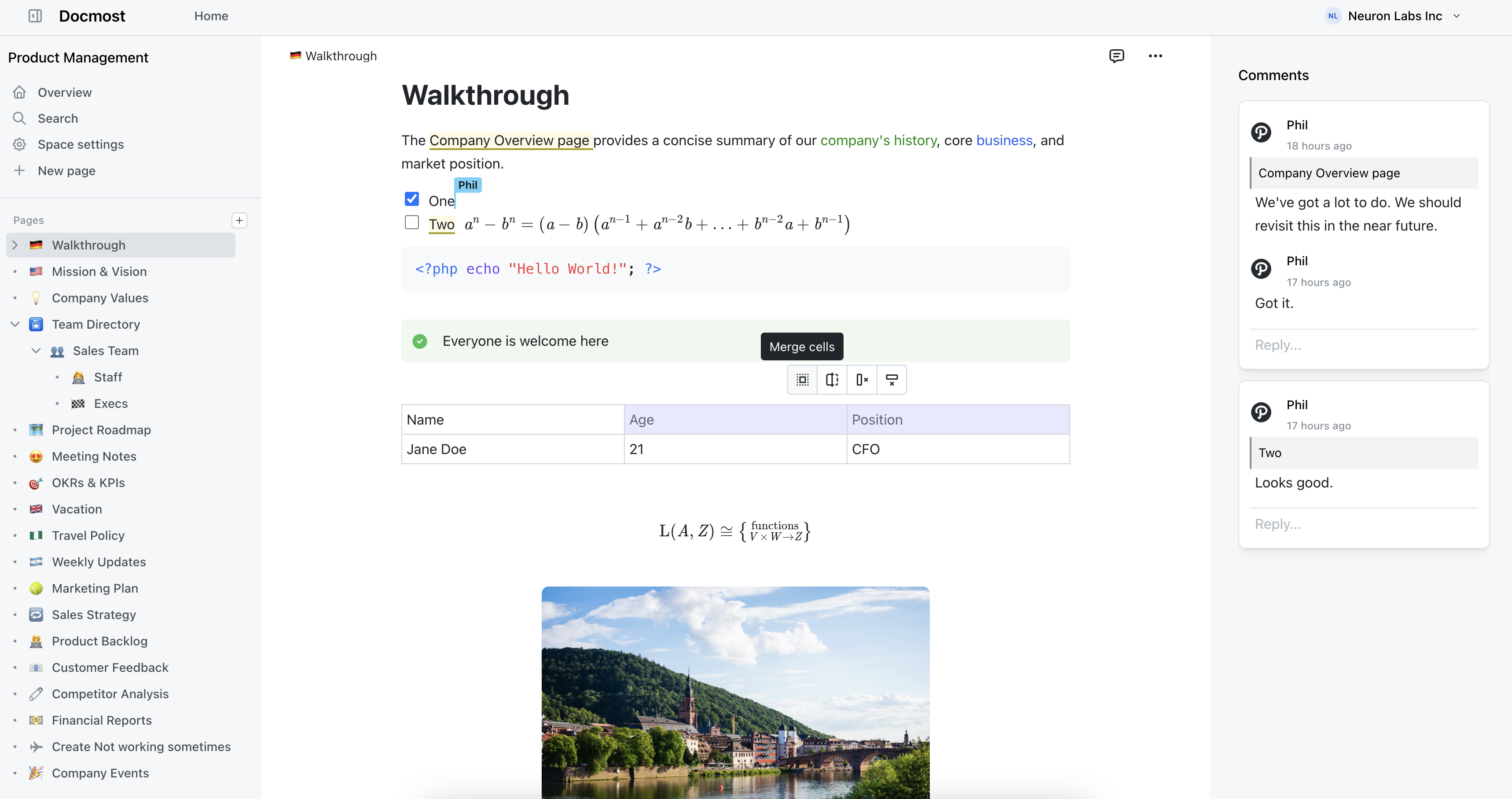
- Real-time collaboration
- Diagrams (Draw.io, Excalidraw and Mermaid)
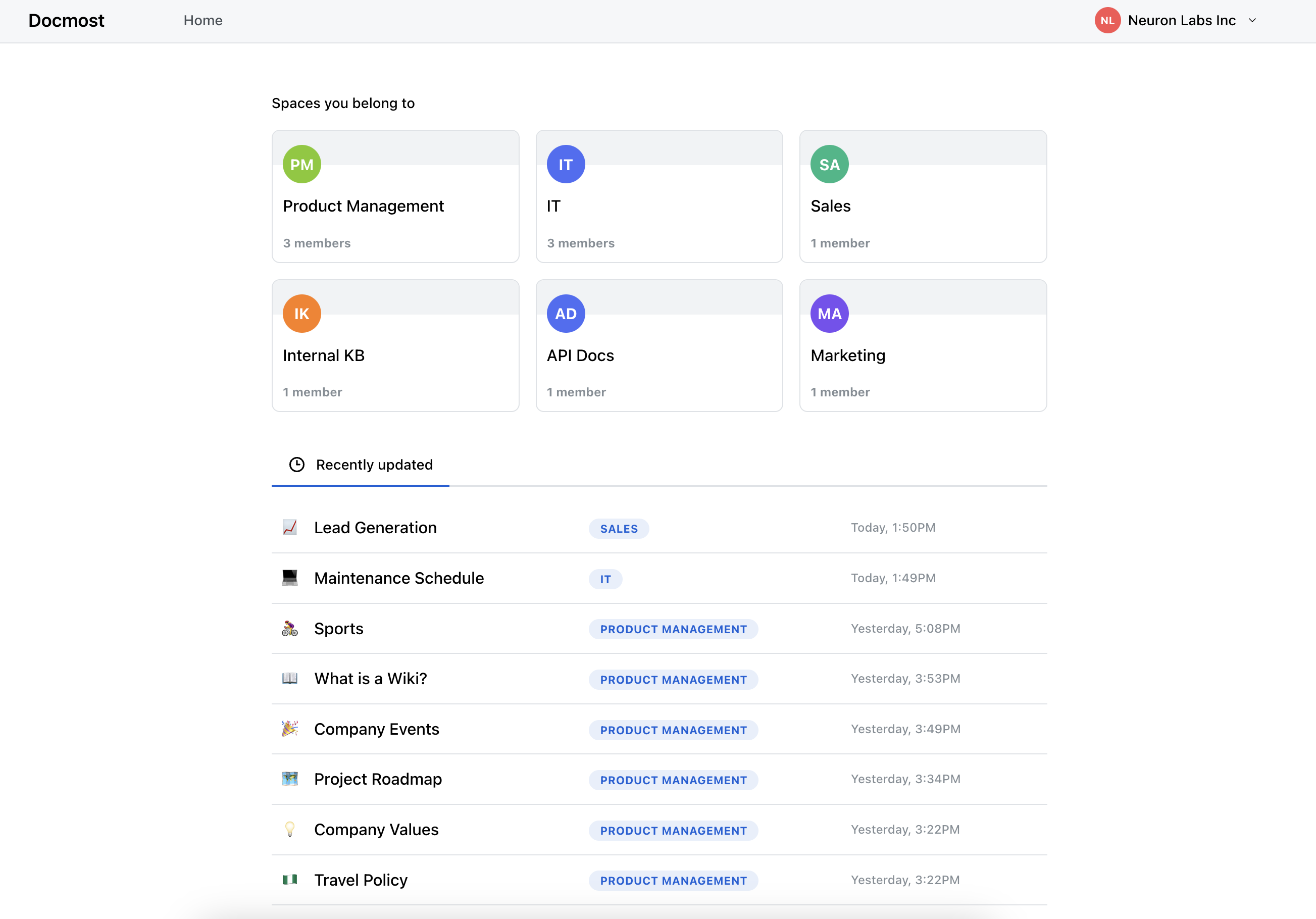
- Spaces
- Permissions management
- Groups
- Comments (with resolve / re-open)
- Page history
- Search
- File attachments
- Embeds (Airtable, Loom, Miro and more)
- Translations (10+ languages)
- Embedded MCP server (
/mcp) - AI agent chat over your wiki (read + write, RAG search, external MCP / web access)
Screenshots

License
Gitmost is licensed under the open-source AGPL 3.0 license.
Unlike upstream Docmost, this fork contains no Enterprise-Edition code — the apps/server/src/ee,
apps/client/src/ee and packages/ee directories have been removed, so there are no files governed
by an enterprise license.
Credits
Gitmost is based on Docmost by the Docmost team. Huge thanks to them for the original open-source project.
Crowdin for providing access to their localization platform.
Algolia for providing full-text search to the docs.